
Verified October 10, 2026 — PC hardware price trackers guide updated.
Finding a graphics card, processor, SSD, or RAM kit at a genuinely good price takes more than checking a retailer’s homepage. Promotional banners can make ordinary prices look exceptional, and attractive offers can disappear before you have time to compare alternatives.
The solution is to stop relying on luck. With the right PC hardware price trackers, you can study price history, create alerts, compare sellers, and decide in advance what you are willing to pay.
Three types of tools are especially useful: CamelCamelCamel and Keepa for supported Amazon marketplaces, and hardware price comparators for comparing products across multiple retailers. This guide explains how to use them together, avoid common mistakes, and turn price tracking into a practical buying strategy. These tools fit into a bigger plan: our cheap gaming PC build guide shows where to save on every component.
Table of Contents
Direct Answer: The Best PC Hardware Price Trackers to Use
To find genuine PC hardware deals, track the exact product with CamelCamelCamel or Keepa when shopping on supported Amazon marketplaces, set a realistic target price, and compare offers across reputable retailers. Check price history, shipping, seller reputation, warranty, and local availability before buying. For hardware sold outside Amazon, use a relevant regional price comparator and verify the final price directly with the retailer.
Why Every PC Builder Should Track Prices
PC components can fluctuate in price for several reasons, including stock availability, retailer promotions, product launches, and changes in demand. A product advertised as discounted is not necessarily cheaper than it was earlier in the month.
Price tracking helps answer four important questions:
- Is the current price lower than the product’s recent selling prices?
- Has the component regularly sold for less than the advertised price?
- Can another reputable retailer offer the same model for less?
- Is the saving large enough to justify buying now rather than waiting?
These tools cannot guarantee that you will find every deal. They can, however, help you make more informed decisions and reduce the chance of purchasing based on a misleading reference price.
1. How to Use CamelCamelCamel
Official website: CamelCamelCamel
CamelCamelCamel is an Amazon price-tracking service that provides historical price charts and price-drop alerts. It also offers the Camelizer browser add-on for viewing price history while browsing supported retailer pages. Available Amazon marketplaces vary by country. See the official tool overview and supported features before choosing a marketplace.
Step 1: Find the Exact Hardware Product
Open the Amazon marketplace you intend to shop from and search for the exact component.
For example, you might look for a specific graphics card, an SSD with a particular capacity, or a processor with a clearly identified model number.
Check the product title, model number, capacity, and variant. Two products that look almost identical may have different specifications or warranties.
Copy the product URL, then open CamelCamelCamel and paste it into the search box.
Step 2: Read the Price History Chart
After locating the product, examine the available historical price graph.
Depending on the marketplace and listing, CamelCamelCamel can display different price series, such as Amazon pricing and eligible third-party offers. The available data is not necessarily identical for every product.
Look for:
- The current price relative to recent prices.
- Repeated price peaks and drops.
- Whether the current offer is unusual or within the product’s normal range.
- Gaps in the history that may limit your conclusions.
Do not judge an offer using one isolated price point. A longer history, when available, gives you more context.
Step 3: Create a Price Watch
CamelCamelCamel’s official instructions describe a simple workflow:
- Find the Amazon product and copy its URL.
- Paste the URL into CamelCamelCamel’s search box.
- Choose the relevant price type and set a tracking target.
- Start tracking and configure the available notification options.
The service can email you when the chosen price condition is met. Read its official price-watch instructions for the current interface.
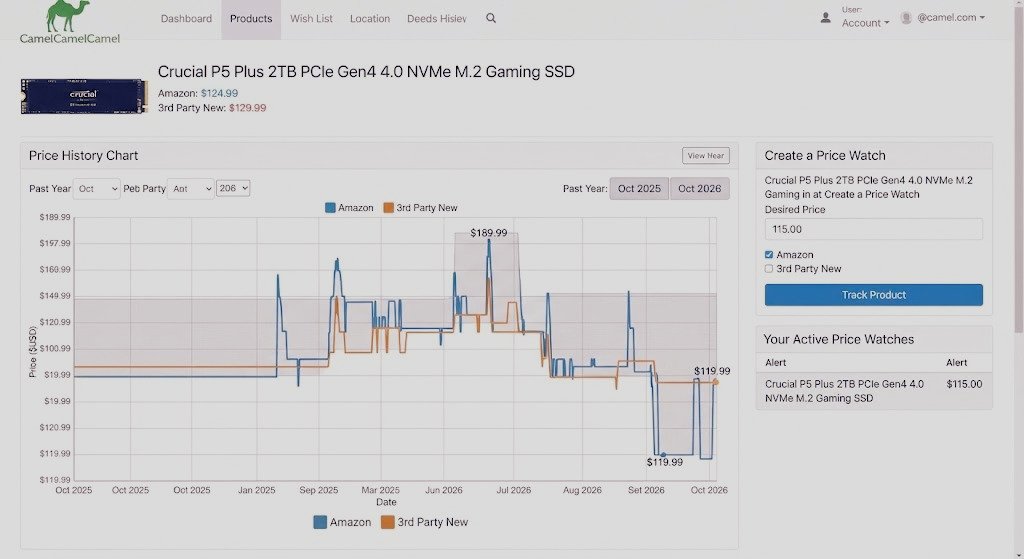
Step 3: Set a Price-Drop Alert
Use the available tracking controls to select the product and configure the price condition you want to monitor.
Set a target that makes sense for your budget and the product’s observed history. If available, choose the relevant marketplace and offer type so the alert reflects the listing you actually intend to purchase.
Keepa’s capabilities vary by feature and plan, so check the current interface rather than assuming every alert or data function is free.
Step 4: Review the Chart Before Acting on an Alert
An alert is a reason to investigate, not an instruction to buy.
When the notification arrives, reopen the product page and confirm the current price, seller, condition, stock, delivery cost, and return policy.
A price may change between the alert and the time you visit the retailer. An offer may also disappear or become available only from a different seller.
Best use for Keepa among PC hardware price trackers: studying available Amazon price history, monitoring selected products, and using price-drop alerts to identify when a listing deserves another look.
3. CamelCamelCamel vs. Keepa: Which of These PC Hardware Price Trackers Should You Use?
Both PC hardware price trackers can help you evaluate Amazon prices, but the best choice depends on how much information you need and which features are available for your marketplace.
| Feature | CamelCamelCamel | Keepa |
| Amazon price history | Yes, where supported | Yes, where supported |
| Price-drop alerts | Yes | Yes, with feature availability depending on the current offering |
| Browser integration | The Camelizer | Keepa offers browser integrations |
| Advanced product data | More focused on price tracking | Additional data and advanced services are available |
| Best starting point | Simple tracking and email alerts | More detailed chart analysis and tracking options |
Neither of these PC hardware price trackers should be treated as a complete comparison engine for every hardware retailer. Their main role is to help you understand prices on supported Amazon marketplaces.
A Simple Decision Rule
Choose CamelCamelCamel if you want a straightforward way to monitor selected Amazon products and receive alerts.
Choose Keepa if its charting, integrations, or additional tracking features better suit your workflow.
You can also use both PC hardware price trackers when a particularly expensive purchase deserves a second check. The aim is not to collect the largest number of tools; it is to gather enough reliable information to make a confident buying decision.
4. Use Hardware Price Comparators to Compare Multiple Shops
PC hardware price trackers built around Amazon answer one question: how has a supported Amazon listing been priced over time?
Hardware price comparators answer a different question that PC hardware price trackers cannot: where can you finda particular component across the retailers and offers they track?
This distinction matters because a product can be competitively priced outside Amazon, and a historical Amazon low does not automatically mean that Amazon is the cheapest current option.
PCPartPicker: Useful for Build Planning and Compatibility
Website: PCPartPicker
PCPartPicker is useful for planning a PC build, checking supported component compatibility, and comparing listed prices from supported retailers in its available regions.
Use it to assemble your proposed parts list and identify possible compatibility problems before buying. Retailer coverage, pricing, and availability depend on your region.
A price comparison is only useful if the parts meet your needs. Check processor socket, motherboard support, RAM type, graphics-card clearance, power-supply requirements, and case dimensions.
Regional Comparators: Check the Shops You Can Actually Buy From
If you are shopping in Morocco, local price comparators can help you investigate listings from Moroccan retailers instead of relying only on international Amazon prices.
Examples include:
- PCPicker.ma — lists PC components and compares offers from Moroccan computer shops.
- PCBuilder Maroc — provides a component comparison and PC configuStep 3: Set a Price-Drop Alert
Use the available tracking controls to select the product and configure the price condition you want to monitor.
Set a target that makes sense for your budget and the product’s observed history. If available, choose the relevant marketplace and offer type so the alert reflects the listing you actually intend to purchase.
Keepa’s capabilities vary by feature and plan, so check the current interface rather than assuming every alert or data function is free.
Step 4: Review the Chart Before Acting on an Alert
An alert is a reason to investigate, not an instruction to buy.
When the notification arrives, reopen the product page and confirm the current price, seller, condition, stock, delivery cost, and return policy.
A price may change between the alert and the time you visit the retailer. An offer may also disappear or become available only from a different seller.
Best use for Keepa: studying available Amazon price history, monitoring selected products, and using price-drop alerts to identify when a listing deserves another look.
3. CamelCamelCamel vs. Keepa: Which One Should You Use?
Both tools can help you evaluate Amazon prices, but the best choice depends on how much information you need and which features are available for your marketplace.
Feature
CamelCamelCamel
Keepa
Amazon price history
Yes, where supported
Yes, where supported
Price-drop alerts
Yes
Yes, with feature availability depending on the current offering
Browser integration
The Camelizer
Keepa offers browser integrations
Advanced product data
More focused on price tracking
Additional data and advanced services are available
Best starting point
Simple tracking and email alerts
More detailed chart analysis and tracking options
Neither service should be treated as a complete comparison engine for every hardware retailer. Their main role is to help you understand prices on supported Amazon marketplaces.
A Simple Decision Rule
Choose CamelCamelCamel if you want a straightforward way to monitor selected Amazon products and receive alerts.
Choose Keepa if its charting, integrations, or additional tracking features better suit your workflow.
You can also use both when a particularly expensive purchase deserves a second check. The aim is not to collect the largest number of tools; it is to gather enough reliable information to make a confident buying decision.
4. Use Hardware Price Comparators to Compare Multiple Shops
Amazon price trackers answer one question: how has a supported Amazon listing been priced over time?
Hardware price comparators answer a different question: where can you find a particular component across the retailers and offers they track?
This distinction matters because a product can be competitively priced outside Amazon, and a historical Amazon low does not automatically mean that Amazon is the cheapest current option.
PCPartPicker: Useful for Build Planning and Compatibility
Website: PCPartPicker
PCPartPicker is useful for planning a PC build, checking supported component compatibility, and comparing listed prices from supported retailers in its available regions.
Use it to assemble your proposed parts list and identify possible compatibility problems before buying. Retailer coverage, pricing, and availability depend on your region.
A price comparison is only useful if the parts meet your needs. Check processor socket, motherboard support, RAM type, graphics-card clearance, power-supply requirements, and case dimensions.
Regional Comparators: Check the Shops You Can Actually Buy From
If you are shopping in Morocco, local price comparators can help you investigate listings from Moroccan retailers instead of relying only on international Amazon prices.
Examples include:
PCPicker.ma — lists PC components and compares offers from Moroccan computer shops.
PCBuilder Maroc — provides a component comparison and PC configuration workflow.
ArkhassPC — offers hardware price comparison and PC-building features.rStep 4: Choose a Target Price You Would Actually Pay - Do not set an arbitrary target simply because it sounds attractive.
- Instead, consider the product’s available price history, prices at other retailers, your budget, and whether a competing component offers better value.
- For example, if you are monitoring a graphics card, your target should reflect what that exact model is worth to you compared with suitable alternatives. It should not be based solely on a retailer’s crossed-out price.
- Best use for CamelCamelCamel: monitoring Amazon listings, checking historical pricing, and receiving alerts when a tracked product reaches your chosen price.
- 2. How to Use Keepa for More Detailed Price Tracking
- Official website: Keepa
- Keepa provides Amazon price-history charts and price-drop alerts across supported marketplaces. It also offers additional product data and advanced services. Feature availability can depend on the product, marketplace, interface, and plan. Start with the official Keepa website.
- Step 1: Search for a Product or Open Its Amazon Listing
- You can start from Keepa or access its price-history information through a supported browser integration.
- Search for the exact product and confirm that the listing corresponds to the hardware model you plan to buy. Pay particular attention to model suffixes, memory capacity, and product variants.
- A chart for the wrong SSD capacity or a different graphics card model will not help you assess the offer you are considering.
- Step 2: Understand the Different Price Lines
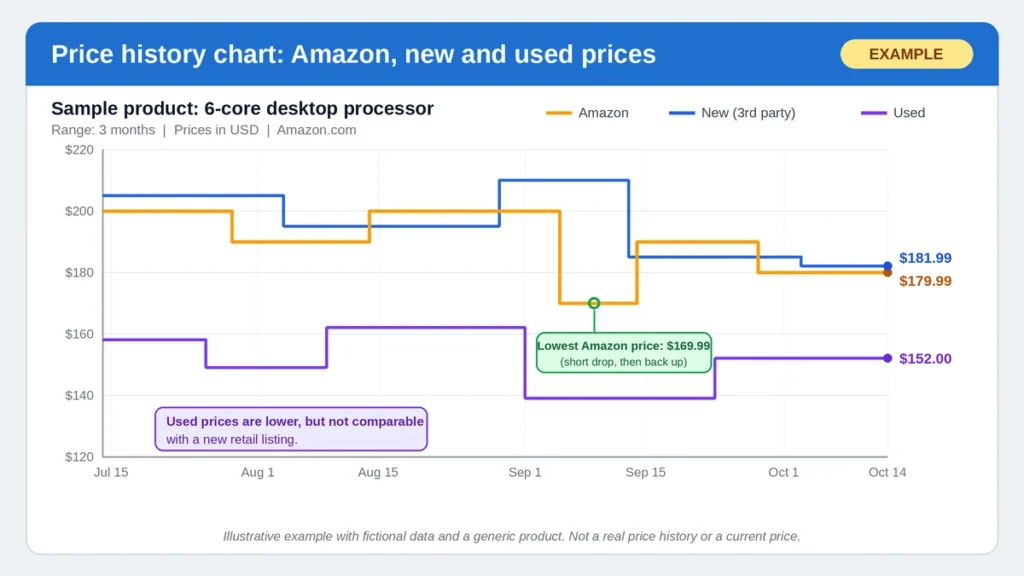
- Keepa charts can contain multiple price series, depending on the product and available data. These may represent Amazon’s price, new marketplace offers, used items, or other supported offer types.
- Before interpreting the chart, identify what each displayed line represents.
- Ask yourself:
- Am I comparing new hardware with new hardware?
- Does the chart represent Amazon’s own offer or a third-party seller?
- Is the product condition the same as the listing I intend to buy?
- Does the chart account for shipping in the relevant price series?
- A lower price for used or refurbished hardware is not directly comparable with a new retail listing.ation workflow.
- ArkhassPC — offers hardware price comparison and PC-building featuStep 4: Choose a Target Price You Would Actually Pay
- Do not set an arbitrary target simply because it sounds attractive.
- Instead, consider the product’s available price history, prices at other retailers, your budget, and whether a competing component offers better value.
- For example, if you are monitoring a graphics card, your target should reflect what that exact model is worth to you compared with suitable alternatives. It should not be based solely on a retailer’s crossed-out price.
- Best use for CamelCamelCamel: monitoring Amazon listings, checking historical pricing, and receiving alerts when a tracked product reaches your chosen price.
- 2. How to Use Keepa for More Detailed Price Tracking
- Official website: Keepa
- Keepa provides Amazon price-history charts and price-drop alerts across supported marketplaces. It also offers additional product data and advanced services. Feature availability can depend on the product, marketplace, interface, and plan. Start with the official Keepa website.
- Step 1: Search for a Product or Open Its Amazon Listing
- You can start from Keepa or access its price-history information through a supported browser integration.
- Search for the exact product and confirm that the listing corresponds to the hardware model you plan to buy. Pay particular attention to model suffixes, memory capacity, and product variants.
- A chart for the wrong SSD capacity or a different graphics card model will not help you assess the offer you are considering.
- Step 2: Understand the Different Price Lines
- Keepa charts can contain multiple price series, depending on the product and available data. These may represent Amazon’s price, new marketplace offers, used items, or other supported offer types.
- Before interpreting the chart, identify what each displayed line represents.
- Ask yourself:
- Am I comparing new hardware with new hardware?
- Does the chart represent Amazon’s own offer or a third-party seller?
- Is the product condition the same as the listing I intend to buy?
- Does the chart account for shipping in the relevant price series?
- A lower price for used or refurbished hardware is not directly comparable with a new retail listing.
Step 3: Set a Price-Drop Alert
Use the available tracking controls to select the product and configure the price condition you want to monitor.
Set a target that makes sense for your budget and the product’s observed history. If available, choose the relevant marketplace and offer type so the alert reflects the listing you actually intend to purchase.
Keepa’s capabilities vary by feature and plan, so check the current interface rather than assuming every alert or data function is free.
Step 4: Review the Chart Before Acting on an Alert
An alert is a reason to investigate, not an instruction to buy.
When the notification arrives, reopen the product page and confirm the current price, seller, condition, stock, delivery cost, and return policy.
A price may change between the alert and the time you visit the retailer. An offer may also disappear or become available only from a different seller.
Best use for Keepa: studying available Amazon price history, monitoring selected products, and using price-drop alerts to identify when a listing deserves another look.
3. CamelCamelCamel vs. Keepa: Which One Should You Use?
Both tools can help you evaluate Amazon prices, but the best choice depends on how much information you need and which features are available for your marketplace.
| Feature | CamelCamelCamel | Keepa |
| Amazon price history | Yes, where supported | Yes, where supported |
| Price-drop alerts | Yes | Yes, with feature availability depending on the current offering |
| Browser integration | The Camelizer | Keepa offers browser integrations |
| Advanced product data | More focused on price tracking | Additional data and advanced services are available |
| Best starting point | Simple tracking and email alerts | More detailed chart analysis and tracking options |
Neither service should be treated as a complete comparison engine for every hardware retailer. Their main role is to help you understand prices on supported Amazon marketplaces.
A Simple Decision Rule
Choose CamelCamelCamel if you want a straightforward way to monitor selected Amazon products and receive alerts.
Choose Keepa if its charting, integrations, or additional tracking features better suit your workflow.
You can also use both when a particularly expensive purchase deserves a second check. The aim is not to collect the largest number of tools; it is to gather enough reliable information to make a confident buying decision.
4. Use Hardware Price Comparators to Compare Multiple Shops
Amazon price trackers answer one question: how has a supported Amazon listing been priced over time?
Hardware price comparators answer a different question: where can you find a particular component across the retailers and offers they track?
This distinction matters because a product can be competitively priced outside Amazon, and a historical Amazon low does not automatically mean that Amazon is the cheapest current option.
PCPartPicker: Useful for Build Planning and Compatibility
Website: PCPartPicker
PCPartPicker is useful for planning a PC build, checking supported component compatibility, and comparing listed prices from supported retailers in its available regions.
Use it to assemble your proposed parts list and identify possible compatibility problems before buying. Retailer coverage, pricing, and availability depend on your region.
A price comparison is only useful if the parts meet your needs. Check processor socket, motherboard support, RAM type, graphics-card clearance, power-supply requirements, and case dimensions.
Regional Comparators: Check the Shops You Can Actually Buy From
If you are shopping in Morocco, local price comparators can help you investigate listings from Moroccan retailers instead of relying only on international Amazon prices.
Examples include:
ArkhassPC — offers hardware price comparison and PC-building features.l.
PCPicker.ma — lists PC components and compares offers from Moroccan computer shops.
PCBuilder Maroc — provides a component comparison and PC configuration workflow.
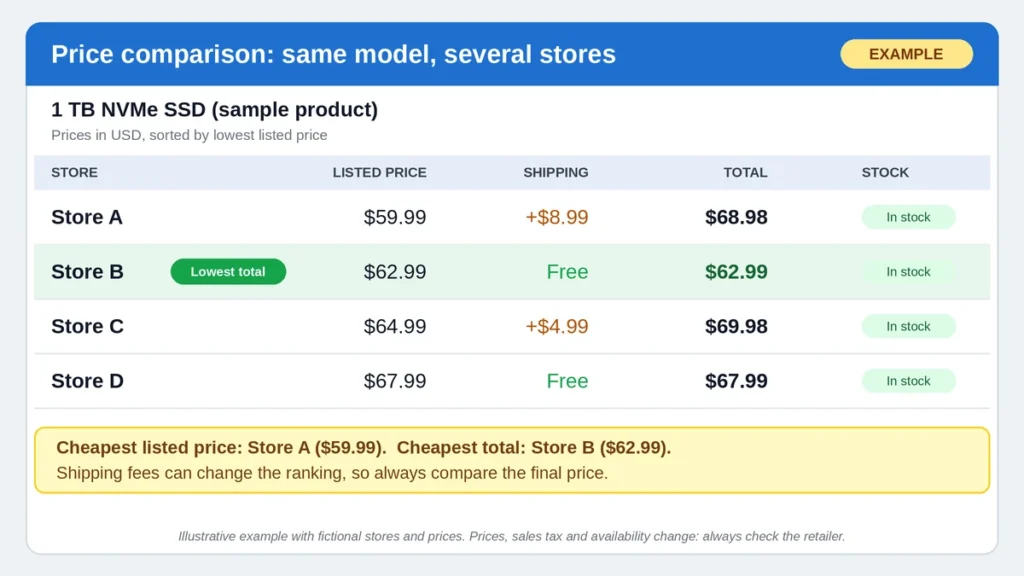
These websites describe their own catalog coverage and features, which can change. Confirm the current listing and price directly with the retailer before purchasing. A comparator’s displayed offer is a starting point, not a guarantee that stock, shipping, or final checkout costs remain unchanged.
How to Compare Two Offers Correctly
When you find the same component at different stores, verify these details:
- Exact model: Compare the full product name and model number.
- Condition: Make sure both listings are new, used, or refurbished as intended.
- Stock: Confirm that the retailer can actually supply the product.
- Shipping and taxes: Add these to the advertised price.
- Warranty: Check who provides warranty service and where it applies.
- Seller reliability: Review the retailer’s identity, return policy, and contact information.
The cheapest displayed number is not necessarily the cheapest safe purchase.
5. Build a Price-Tracking Workflow That Works
You do not need to monitor dozens of websites manually every day. A simple process is enough to keep the most important components on your radar.
Step 1: Make a Shortlist Before Shopping
Write down the components you intend to buy and record their exact model numbers.
For a gaming PC, this could include the graphics card, processor, motherboard, RAM kit, SSD, power supply, and case.
Add your budget and the maximum price you would pay for each part. This prevents an attractive promotion from pushing you toward a component that does not fit the build.
Step 2: Save the Current Price and the Source
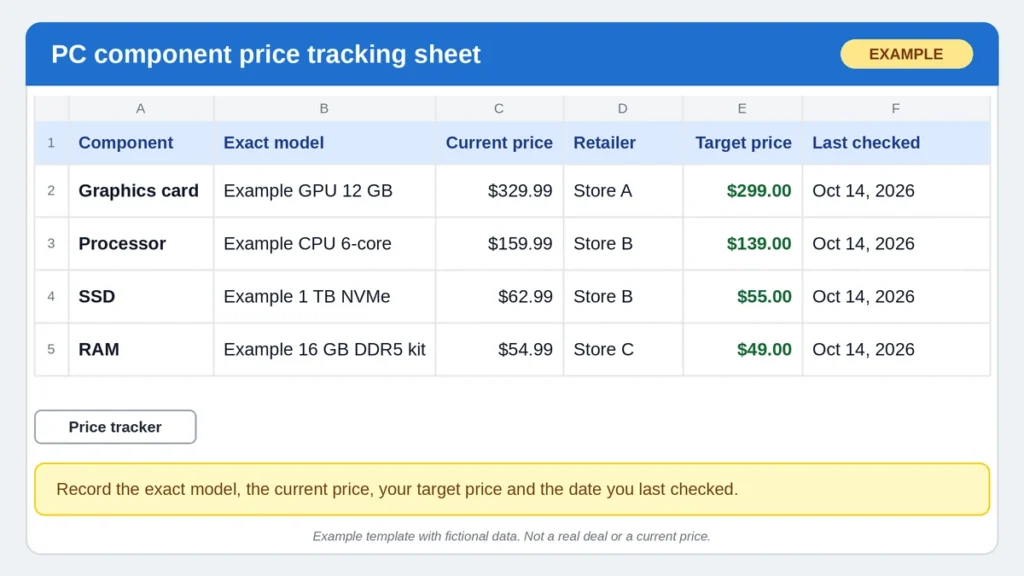
Create a spreadsheet or notes document with columns such as:
| Component | Exact model | Current price | Retailer | Target price | Last checked |
| Graphics card | [Model to fill in] | [Verify] | [Retailer] | [Set target] | [Date] |
| Processor | [Model to fill in] | [Verify] | [Retailer] | [Set target] | [Date] |
| SSD | [Model to fill in] | [Verify] | [Retailer] | [Set target] | [Date] |
These are tracking fields, not live prices or a claim about a current deal.
Step 3: Set Alerts Only for Products You Might Buy
Too many alerts create noise. Track the exact components that fit your build and use a target price that would make you seriously consider purchasing.
If you have several acceptable GPU or CPU options, track a small shortlist rather than assuming only one model can meet your needs.
Step 4: Check Prices at Regular Intervals
Review your shortlist periodically, especially before major sales events such as Black Friday and Prime Day (see our guide on the best time to buy PC components). When an alert arrives, compare the offer with the recent history and current prices at other retailers.
Do not change your target every time a price moves. Revisit it when your budget, preferred performance level, or available alternatives change.
Step 5: Confirm the Final Offer
Before checking out, open the retailer’s page directly. Verify the exact model, seller, condition, availability, shipping cost, taxes, and warranty.
This final check is essential because tracking data can be delayed, a listing can change, or a price can disappear before you complete the purchase.
6. How to Calculate Whether a Deal Is Worth It
A price tracker is most useful when you turn the information into a clear buying decision.
Use these formulas:
Saving amount = reference price − current price
Discount percentage = (saving amount ÷ reference price) × 100
For illustration only, suppose a component has a verified reference price of 200 currency units and is currently listed for 170. The difference is 30 units, which equals a 15% reduction against that reference price.
This is a hypothetical example, not a current product deal.
For real editorial claims, identify the source and date of the reference price. A manufacturer’s suggested retail price, a retailer’s crossed-out figure, a marketplace offer, and a historical average are different things.
To calculate the actual value of a purchase, also consider:
- Shipping and applicable taxes.
- Warranty and return conditions.
- Whether the model meets your performance requirements.
- Whether a similarly priced alternative offers better value.
A lower price is not automatically a better deal if it comes with worse coverage, uncertain stock, or unsuitable specifications.
7. Common Price-Tracking Mistakes to Avoid
Mistake 1: Tracking the Wrong Product Variant
Graphics cards can have different cooling designs and model suffixes. SSDs come in multiple capacities, and RAM kits have different speeds and configurations (not sure which generation you need? See how to choose the right RAM for your build).
Always match the exact product before comparing charts or offers.
Mistake 2: Treating Every Price Drop as a Bargain
A price can fall and still remain above the level you consider reasonable. Compare the current listing with its available history and other reputable sellers.
Mistake 3: Ignoring Shipping and Import Costs
A cheaper international offer may become more expensive after delivery, customs charges, and currency conversion. It may also have less convenient warranty service.
For purchases in Morocco, compare the final delivered cost with local offers in MAD, not just the converted headline price.
Mistake 4: Comparing New, Used, and Refurbished Hardware as If They Were Identical
Different product conditions carry different risks and warranties. Make sure the price history and current offer refer to comparable conditions. Our safety checks for used and refurbished PC components explain how to compare them fairly.
Mistake 5: Assuming Every Retailer Is Covered
Amazon-focused trackers do not monitor every independent hardware shop. A regional comparator may also have gaps, outdated listings, or limited coverage.
Always verify the final offer on the retailer’s own website.
Mistake 6: Buying Because an Alert Creates Urgency
A notification simply tells you that a chosen condition may have been met. It does not establish that the component is compatible, that the seller is trustworthy, or that the price is the best available.
Use the alert to start your final checks—not to skip them.
8. The Best Tool Combination for Budget Gaming PC Builders
For most shoppers, the strongest approach is to combine price history with current price comparison.
- For Amazon history: use CamelCamelCamel or Keepa on a supported marketplace.
- For multi-retailer pricing: use a hardware comparator that covers the region where you intend to buy.
- For compatibility: use a PC configuration tool and verify any important requirements with the component manufacturers.
- For the final decision: confirm the seller, stock, shipping, warranty, and total checkout price. See also how to spot a fake PC deal.
If you are building in Morocco, start with a local comparator to establish realistic local prices, then compare international options only when shipping, taxes, and warranty conditions make sense. Do not assume an overseas discount will translate into a cheaper final purchase. Then plan the whole build with our complete cheap gaming PC guide.
Final Verdict: Track the Price, Compare the Shop, Verify the Deal
CamelCamelCamel, Keepa, and hardware price comparators each solve a different part of the buying process. These PC hardware price trackers help you understand historical pricing and create alerts, while comparators help you find and compare offers across supported retailers.
The most reliable routine is simple: shortlist exact models, record prices, set realistic targets, investigate alerts, compare the total cost, and confirm every detail with the seller before paying. Combine it with the seasonal sales calendar to know when to watch your shortlist more closely.
No tool can promise that you will never miss a deal. But a disciplined tracking process makes it much easier to recognize genuine value, avoid misleading discounts, and spend your gaming PC budget on components that are actually worth buying.
Frequently Asked Questions
Are CamelCamelCamel and Keepa free?
CamelCamelCamel offers free Amazon price tracking and email alerts. Keepa provides price-history charts and price-drop alerts, but some features and advanced data services may require payment. Check each tool’s current plan and feature limits before relying on it.
Can I use these tools to compare every PC shop?
No. CamelCamelCamel and Keepa focus on supported Amazon marketplaces. They do not provide a complete comparison of every independent hardware retailer. Use a regional PC component comparator, then verify the listing, stock, shipping, and warranty on the seller’s own website.
How do I know whether a hardware discount is genuine?
Check the exact model’s price history, compare the current offer with other reputable sellers, and calculate the final cost including shipping and taxes. A large advertised percentage is not proof of a bargain. Confirm the seller, product condition, return policy, and warranty before purchasing.
Affiliate Disclosure: This article may contain affiliate links. If you purchase through qualifying links, the publisher may earn a commission at no additional cost to you. Recommendations should be based on relevance, compatibility, and verified value—not commission rates.
Pingback: Cheap Gaming PC Build Guide: Save on Every Part (2026)