
Finding the best gaming laptops under $1000 requires balancing frame rates, thermal management, and long-term chassis durability. While evaluating a portable system differs fundamentally from assessing desktop tow er configurations as analyzed in our full comparison on [Gaming laptop vs desktop the complete 2026 comparison] entry-level mobile gaming rigs have matured significantly.
Rather than settling for compromised entry-level performance, today’s sub-$1000 market features highly competitive options. Two models dominate this tier: the ASUS TUF Gaming A15 and the acer nitro 5. Both laptops deliver 1080p gaming performance, yet they take distinctly different approaches to cooling design, chassis materials, and hardware efficiency.
Direct Answer: The best gaming laptops under $1000 balance sustained 1080p frame rates with efficient chassis thermals. Comparing budget entry points like the ASUS TUF gaming A15 and Acer Nitro 5 shows that structural rigidity, thermal headroom, and MUX switch integration differentiate long-term gaming value far more than raw component spec sheets alone.
Thermal headroom and acoustic profiles under load
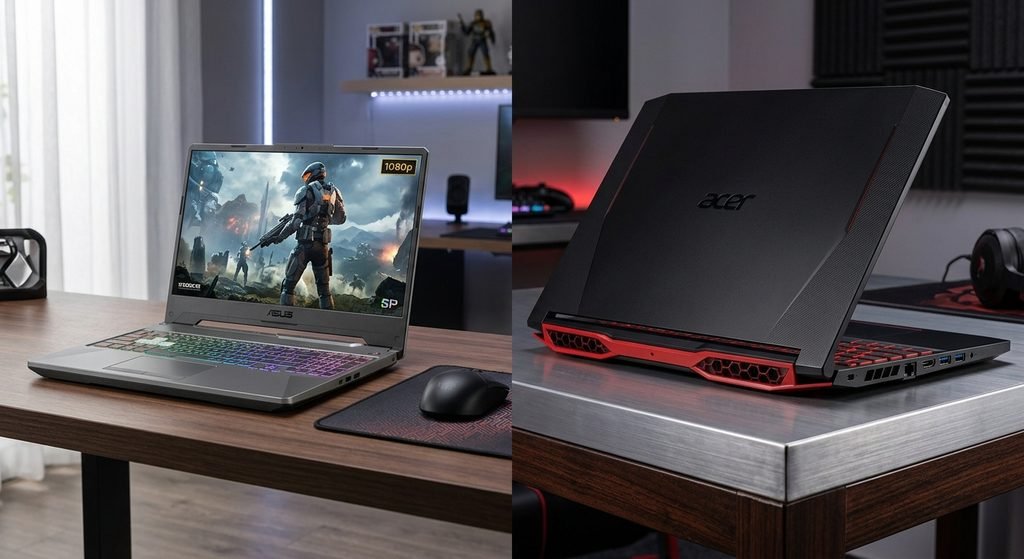
When comparing the best gaming laptops under $1000, thermal dissipation directly dictates sustained clock speeds during extended sessions. Compact mobile chassis face physical constraints that do not exist in larger desktop builds.
The ASUS TUF gaming A15 features dual arc flow fans paired with dedicated heat pipes spanning the CPU and GPU. Under sustained gaming loads in titles like Cyberpunk 2077 or Shadow of the Tomb Raider, the TUF A15 manages heat distribution effectively across its chassis keyboard deck. Its fan profile remains reasonably controlled in default performance modes, reducing acoustic noise while preventing severe thermal throttling.
Conversely, the acer nitro 5 relies on a high-velocity quad-exhaust system configured via its onboard NitroSense software. While pushing the Nitro 5 to its maximum performance profile keeps component temperatures stable, it achieves this by running the internal cooling fans at higher RPMs. This creates a noticeably louder acoustic profile under load. Gamers who prefer playing without noise-canceling headsets may find the TUF A15’s acoustic curve less intrusive over longer play periods.
Chassis build quality, display, and portability

Evaluating the best gaming laptops under $1000 extends beyond internal silicon to external build quality and screen performance. Daily handling tests the physical structural integrity of budget laptops.
The ASUS TUF Gaming A15 meets MIL-STD-810H military-grade testing standards for drop, vibration, and thermal resistance. The lid features a clean finish, and the keyboard deck exhibits minimal flex under firm typing pressure. Its 15.6-inch Full HD 144Hz panel supports Adaptive-Sync, reducing screen tearing in fast-paced competitive shooters like Counter-Strike 2 or Apex Legends. Furthermore, configurations equipped with the larger 90Wh battery offer superior battery life during unplugged web browsing and productivity tasks.
The acer nitro 5 adopts an unapologetically gamer-centric design language with sharp angles, red accenting, and a 4-zone RGB backlit keyboard. Its chassis utilizes textured plastics throughout. While sturdily assembled, the chassis exhibits slight deck flex under pressure compared to the TUF A15. The Nitro 5 features a 15.6-inch 144Hz IPS panel with solid viewing angles, though maximum panel brightness remains limited for bright outdoor environments. Where the Nitro 5 excels is port placement: positioning its power connector and HDMI output on the rear spine allows for cleaner desk cable management.
Value and component upgrade potential
A major consideration when buying entry-level laptops is post-purchase expansion. Both machines avoid soldered memory traps, making them strong candidates among the best gaming laptops under $1000 for users who plan to upgrade over time.
Removing the bottom panel on either machine grants direct access to two SODIMM DDR5 RAM slots and dual M.2 PCIe NVMe SSD slots. Adding a second storage drive or expanding system memory to 32GB requires minimal technical skill on either chassis.
The primary differentiation comes down to baseline efficiency and peripheral integration:
- ASUS TUF Gaming A15: Combines military-grade chassis durability, higher battery endurance, and smoother fan profiles.
- Acer Nitro 5: Offers comprehensive port distribution, a dedicated NitroSense control key, and aggressive styling.
Comparison summary: ASUS TUF A15 vs acer nitro 5
| Criterion | ASUS TUF gaming A15 | Acer nitro 5 |
|---|---|---|
| Thermal management and acoustics | Dual arc flow fans, sustained clocks under load | High-RPM fan profiles, higher acoustic output |
| Display and color accuracy | 15.6″ FHD 144Hz, Adaptive-sync support | 15.6″ FHD 144Hz, narrow sRGB gamut coverage |
| Chassis and build durability | MIL-STD-810H military-grade compliance | All-plastic construction, moderate deck flex |
| Battery capacity | Up to 90Wh battery capacity | 57.5Wh battery capacity |
| Port layout | Side-heavy port arrangement | Rear-mounted power and HDMI routing |
Final verdict: choosing your budget setup
Selecting between these two options comes down to whether you prioritize acoustic comfort and chassis durability or port distribution and aggressive design.
- Pick B if… Pick the Acer Nitro 5 if you want maximum port accessibility across all three sides and aggressive gaming aesthetic styling at a competitive price tag. Check current pricing here: https://track.afftgo.win/5A1G/2J2E7/?source=gads&campaignid={campaignid}&campaign_id={campaignid}&adgroupid={adgroupid}&creative={creative}&keyword={keyword}&device={device}&network={network}
Frequently asked questions
Are budget gaming laptops under $1000 capable of playing modern AAA titles? Yes, machines in this price tier easily achieve 60+ FPS at 1080p medium-to-high settings in current titles using hardware DLSS or FSR upscaling.
Which laptop offers better long-term thermal cooling between the TUF A15 and nitro 5? The ASUS TUF gaming A15 generally maintains lower surface temperatures due to its denser heatsink layout, whereas the Acer Nitro 5 relies on higher fan speeds.
Can you upgrade memory and storage on these budget gaming laptops later? Both models feature accessible dual DDR5 RAM slots and two M.2 PCIe NVMe SSD slots, allowing straightforward memory and storage expansion after purchase.
Pingback: Gaming Laptop vs Desktop: The Ultimate 2026 Comparison